I watched another Book Creator webinar by Monica Burns from Class Tech Tips to learn more about the real-time collaboration aspect of Book Creator. To be clear and upfront, the real-time collaboration is a newer feature for Book Creator and is also part of the paid version. Look closely at the different price ranges Monica shared during the webinar.

One question Monica asked the participants is how are your learners already using collaboration in your classroom? A few of the answers were Flipgrid, Padlet, and G Suite for Education. Collaboration is an important skill we must practice and practice with learners. Collaboration is probably already happening in your classroom, but how are you asking learners to work together? Maybe learners are all reflecting on a common topic or experience. Maybe learners are brainstorming and inspiring each other. Maybe learners are all contributing a portion of a book to create a larger scale end product. Have you ever thought about the different ways learners collaborate? I thought it was interesting the graphic Monica shared to explain the different types of collaboration.

To specifically use the real-time collaboration feature there are a few steps to get up and running for your learners
1. Create a teacher shared library
2. Through settings, invite users to join your book using an invite code
3. When you are finished with the collaboration aspect, turn off collaboration
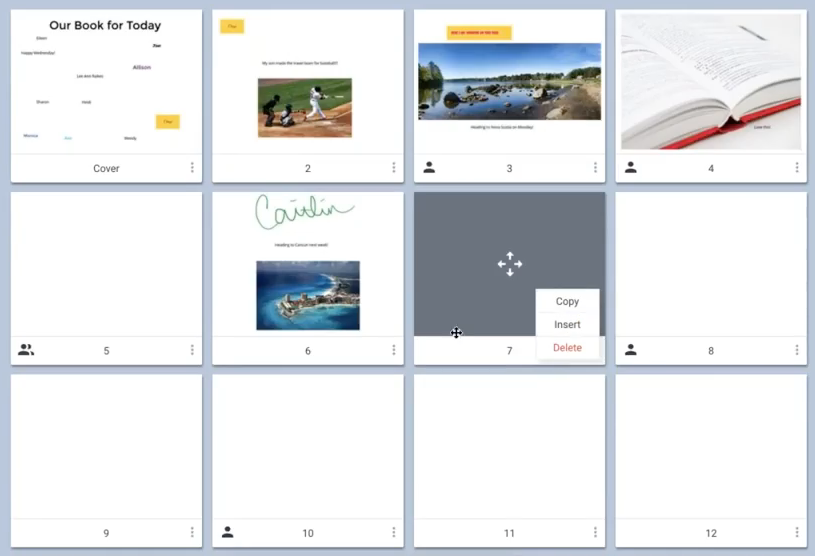
Notice the blue outline to show where you are working on a page.

Also, with each learner having their own page, you can monitor progress all at once!
Some other tips to keep in mind when working in a collaborative space:
1. Set very clear expectations for what work should be done
2. Create and assign each learner a different page to add their work
3. Assign which pages each learner will provide feedback for their classmates
4. Turn off the collaboration feature when learners are no longer working in the shared space in order to avoid work being edited by someone else.
Feedback can come in 2 different styles when using Book Creator. Learners can create a new text box to type a response; or, learners can use the audio recording feature to share verbal feedback. Either way, once the person has received their feedback they can then delete that particular feature from their own page. With some many different tools to use learners will enjoy creating and sharing!
I really enjoyed this webinar and it helped me to see what other types of possibilities are available when using Book Creator. Thank you, Monica! How would you like to use the real-time collaboration piece?